

Made with TAO-1 › Password generator
Build your own password generator in under a minute
A TAO-1 password generator is a working password generator built from one plain-English request: you describe what you want, and TAO-1 builds it.
Updated
Tell TAO-1 who the passwords are for and which options matter. It builds a generator that makes a batch at a time, rates each password and copies it with one click.

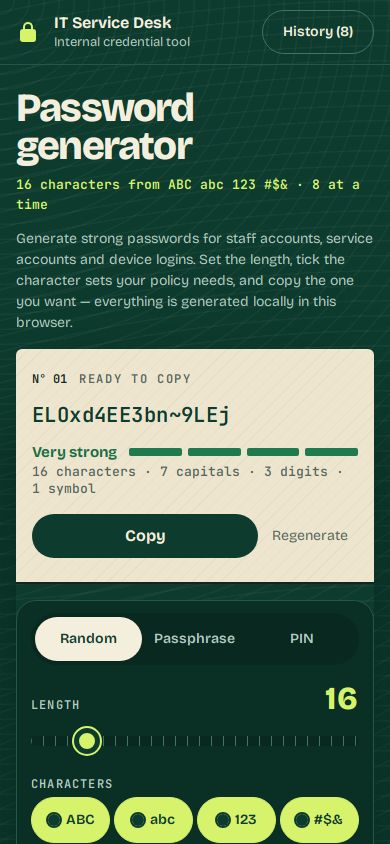
What's in a TAO-1 password generator?
Three modes
Random characters, passphrases of 4 to 10 words, or PINs of 4 to 12 digits, picked with one tab.
Length and character sets
A slider from 8 to 64 characters and toggles for upper case, lower case, numbers and symbols. Every password includes at least one of each ticked set.
Leave out look-alikes
One switch removes I, l, 1, O and 0, so passwords read back cleanly over the phone or from a screen.
A batch at a time
Make 6, 8, 10 or 12 passwords at once, each with its own Copy and Regenerate button. The first one sits in a large Ready to copy card.
Strength you can read
Each password shows a strength rating, its entropy in bits and a rough time to crack; the batch shows weakest, strongest and median.
Made in the browser
Passwords come from the browser's secure random generator. Only your settings are saved, and the last ten passwords stay in a history that clears when you leave.
Is a TAO-1 password generator right for you?
A good fit if you want a first version live quickly and are happy to edit the details yourself.
Check before you share it: a first version can include placeholder contact details, photos and reviews. Replace them with your own.
How do I make a password generator with TAO-1?
1. Say what you want
Type something like "a password generator for our IT team with length and symbol options and a copy button". Add any rules your team follows.
2. Watch it build
TAO-1 builds the tool, checks that the options, generate and copy buttons work, and shows you a live preview. This one took 43 seconds.
3. Change it by asking
Ask for changes in plain words ("require at least two symbols", "add our logo"), then publish it to a link your team can open.
What else can I add to my password generator?
Require at least two digits and two symbols in every passwordAdd a box where I paste a password and see its strengthLet me choose the separator for passphrasesAdd a button that copies the whole batch as a listAdd a preset for our Wi-Fi guest passwords
Questions about password generators
Are the passwords sent anywhere?
No. In this build they are made in your browser with its secure random generator, and only your settings are saved on the device.
How is the strength worked out?
From the number of possible passwords with your settings, shown in bits, with a rough crack time at ten billion guesses a second. Treat it as an estimate.
How much does it cost?
New accounts start with $5 of free credit, which is enough to build and change a tool like this one.